
Who this is for: Brands, marketing teams, and content creators that want to use AI Doer to build a company knowledge base, improve visibility in generative search, and consistently produce content that AI systems can cite.
Where it applies: Brand discovery, recommendations, source citations, and content operations across generative search and answer engines such as ChatGPT.
1. GEO Goals and Core Logic
GEO—Generative Engine Optimization—is not simply “publishing articles at scale,” and it is not the same as ranking for keywords in traditional SEO. The goal is to:
- Make your company and its content discoverable by generative AI;
- Help AI systems accurately understand who you are, what you offer, and which customers and use cases you serve;
- Structure your facts, data, and perspectives so they can be cited by AI;
- Increase the likelihood that your brand is accurately mentioned and included in the consideration set when people ask purchasing, comparison, recommendation, and product-selection questions;
- Re-run a fixed set of questions over time to see whether brand visibility, factual accuracy, and source quality are improving.
AI Doer turns scattered company materials into searchable, traceable, structured knowledge, then connects the entire operating loop: baseline measurement → knowledge organization → topic planning → content production → publishing → retesting.
The four core assets you will build
- Company Knowledge and Facts Repository: Verifiable facts about products, capabilities, specifications, certifications, case studies, markets, and customer pain points;
- GEO Monitoring Report Repository: Fixed questions, raw AI answers, sources, scores, and conclusions from each measurement cycle;
- Keyword and Distilled-Topic Repository: Core industry terms and mid- to long-tail questions with commercial decision intent;
- GEO Content and Article Repository: Drafts awaiting review, content ready to publish, and published pieces, with each topic and source kept traceable.
2. Before You Begin
1. Tools you will need
- AI Doer desktop client;
- Google Chrome;
- OpenCLI Chrome extension;
- A Notion account;
- Your company website and company materials that can be used publicly;
- Accounts on the platforms where you plan to publish, such as your website blog, Facebook, Reddit, or industry publications.
2. Materials to organize in advance
Start with the following. The more specific the information, the stronger your later keyword and article outputs will be:
- Official company name, brand aliases, website URL, and a one-sentence positioning statement;
- Product or service categories, features, specifications, materials, and use cases;
- Target customers, target markets, service regions, and delivery capabilities;
- Objective facts such as founding date, team size, production capacity, certifications, and patents;
- Customer case studies, project timelines, outcome data, and supporting evidence that can be made public;
- Common customer questions, purchasing concerns, pricing factors, and selection criteria;
- News coverage, industry reports, white papers, product manuals, and public webpages.
3. The Complete AI Doer GEO Workflow
Step 1: Install AI Doer, Google Chrome, and OpenCLI
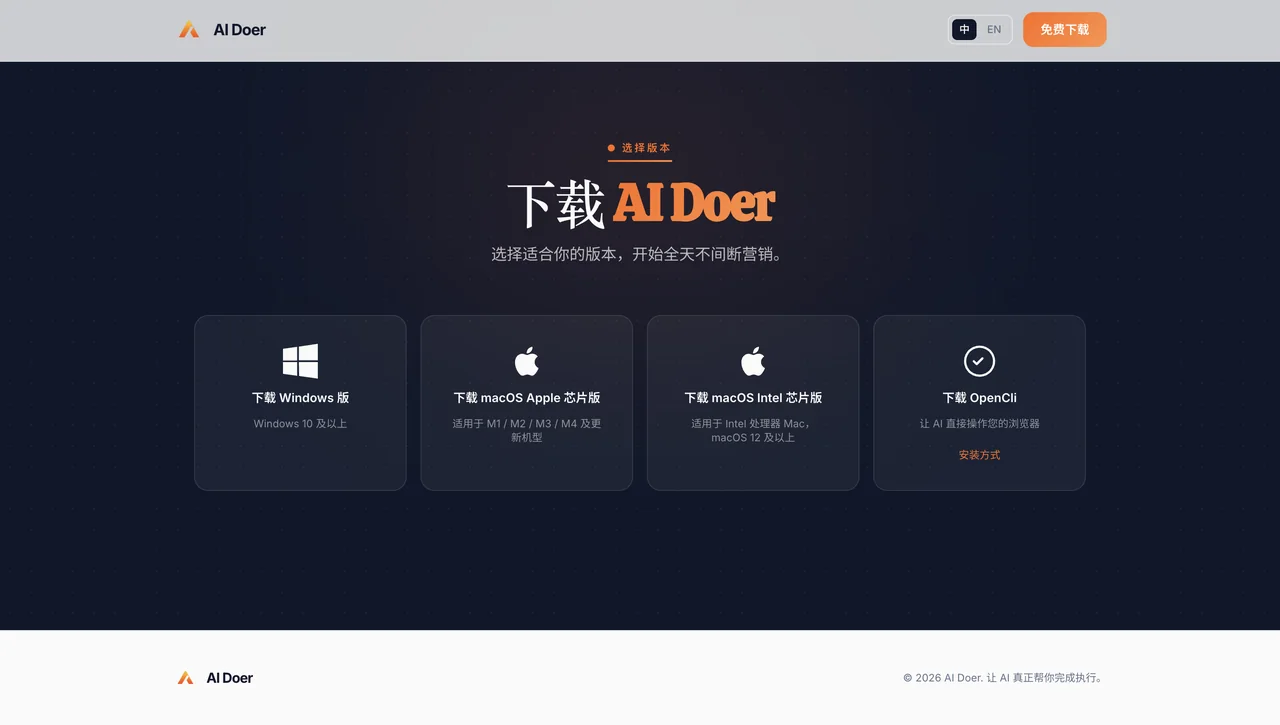
- Go to the AI Doer website and download the version for your operating system:
- Download: https://aidoer.ai/download
- Windows;
- macOS for Apple silicon;
- macOS for Intel processors.
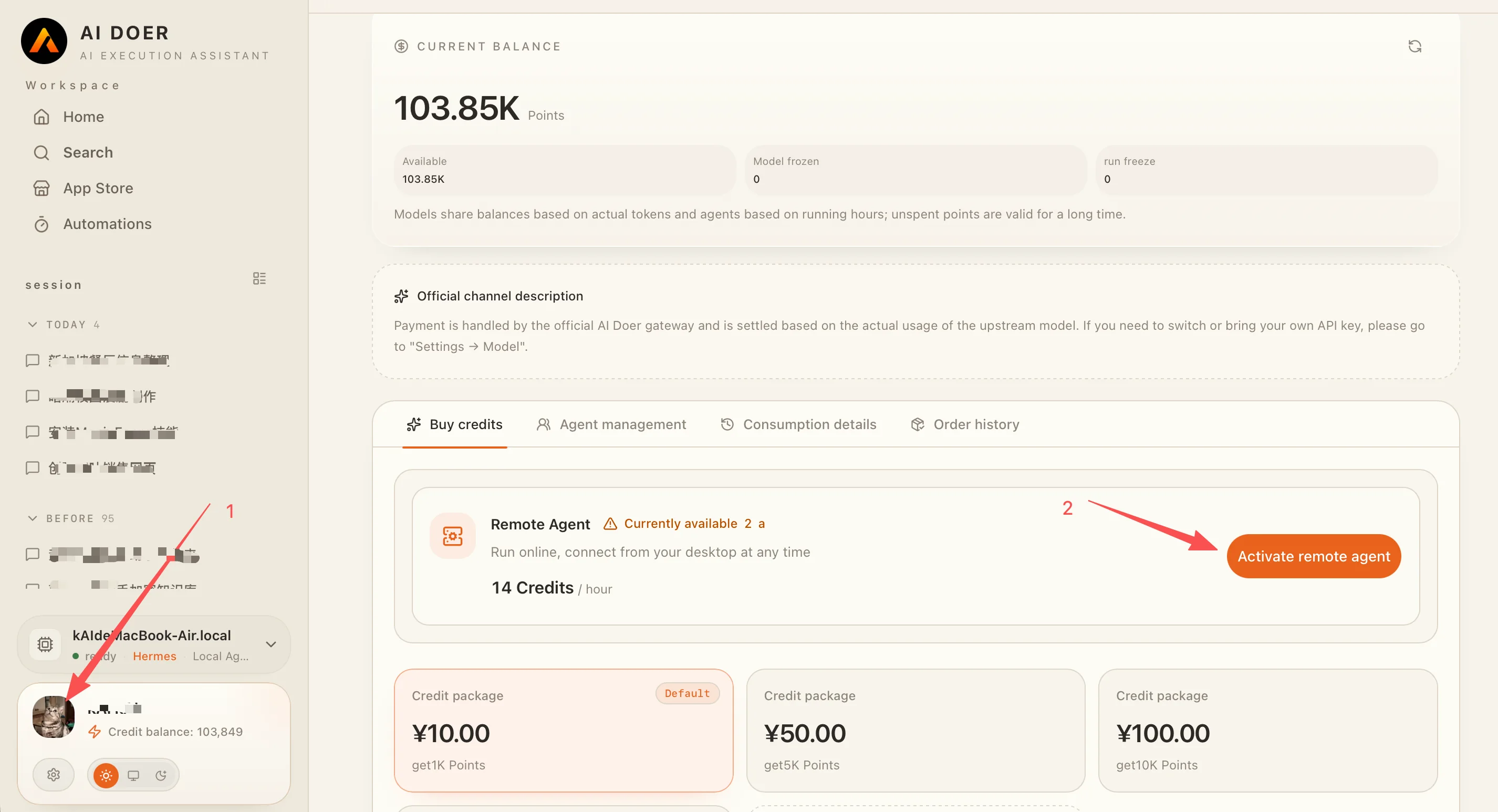
After installing AI Doer, Windows users need to purchase and enable a Remote Agent. Mac users can choose a Local Agent or Remote Agent depending on their needs.
To purchase and enable a Remote Agent:
- Click your profile picture in the bottom-left corner;
- Click Enable Remote Agent, then follow the on-screen steps to complete the purchase and turn it on.
AI Doer supports multiple AI models. Each has different strengths in capability, response speed, and cost: Chinese models are generally more cost-effective, while U.S. models tend to perform better on complex tasks and overall capability. Choose according to the task, budget, and quality you need.
- Download Google Chrome: https://www.google.com/intl/zh-CN/chrome/
- Install the OpenCLI extension in Chrome. Once installed, OpenCLI allows AI Doer to operate the browser, access social platforms, and carry out browser-based tasks.
Option 1: Install manually
- Click the button above to download the OpenCLI installation package as a
.zipfile; - Extract the
.zipfile to a folder; - Open Chrome, enter
chrome://extensions/in the address bar, and press Enter; - Turn on Developer mode in the top-right corner;
- Click Load unpacked in the top-left corner;
- Select the folder you extracted in Step 2;
- OpenCLI is now installed, and AI Doer can operate Chrome through it.
Option 2: Install from the Chrome Web Store
- Open the OpenCLI search results in the Chrome Web Store and select OpenCLI;
- Click Add to Chrome;
- OpenCLI is now installed, and AI Doer can operate Chrome through it.
Step 2: Create a GEO Workspace and Connect Notion
1. Initialize the GEO workspace
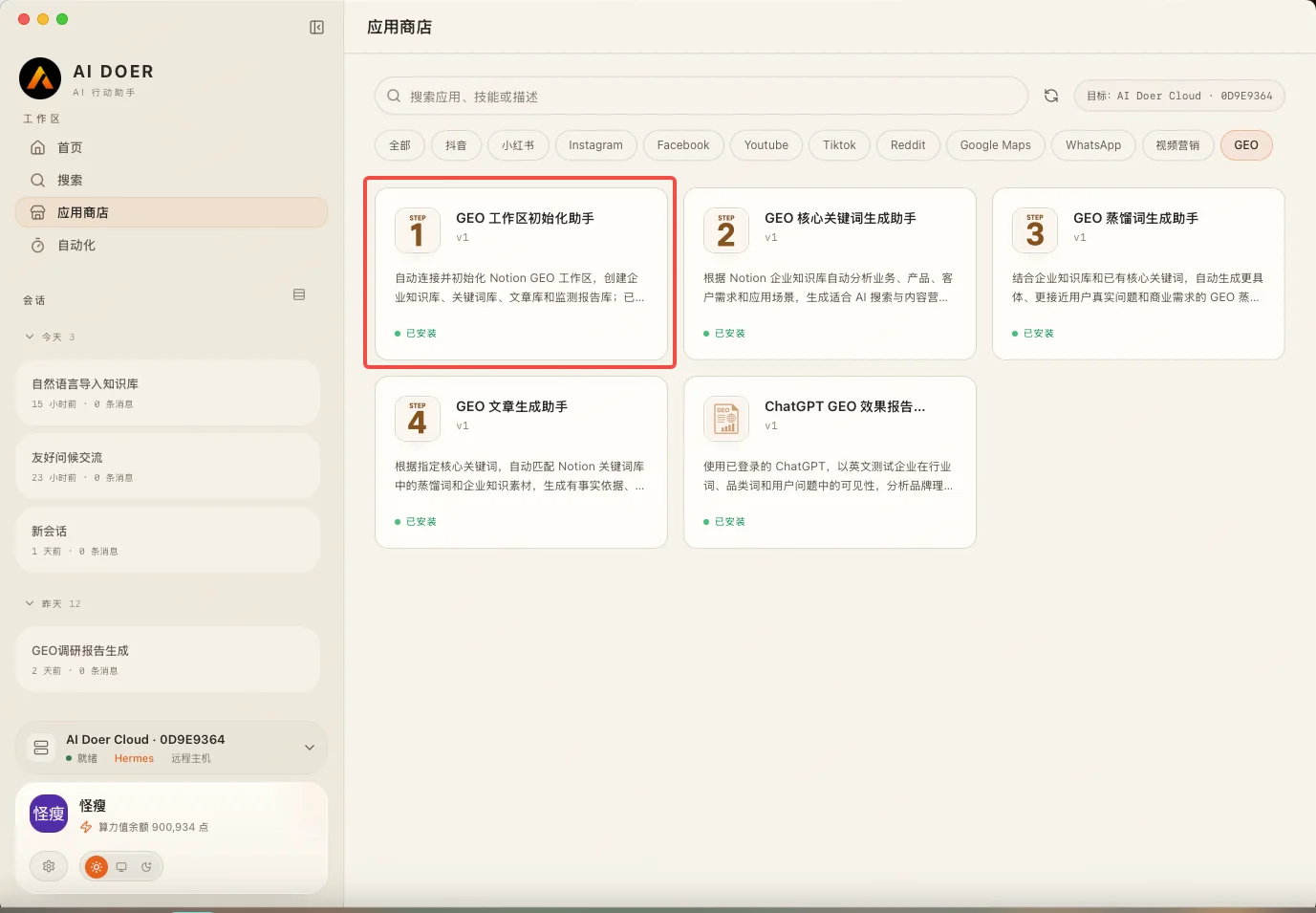
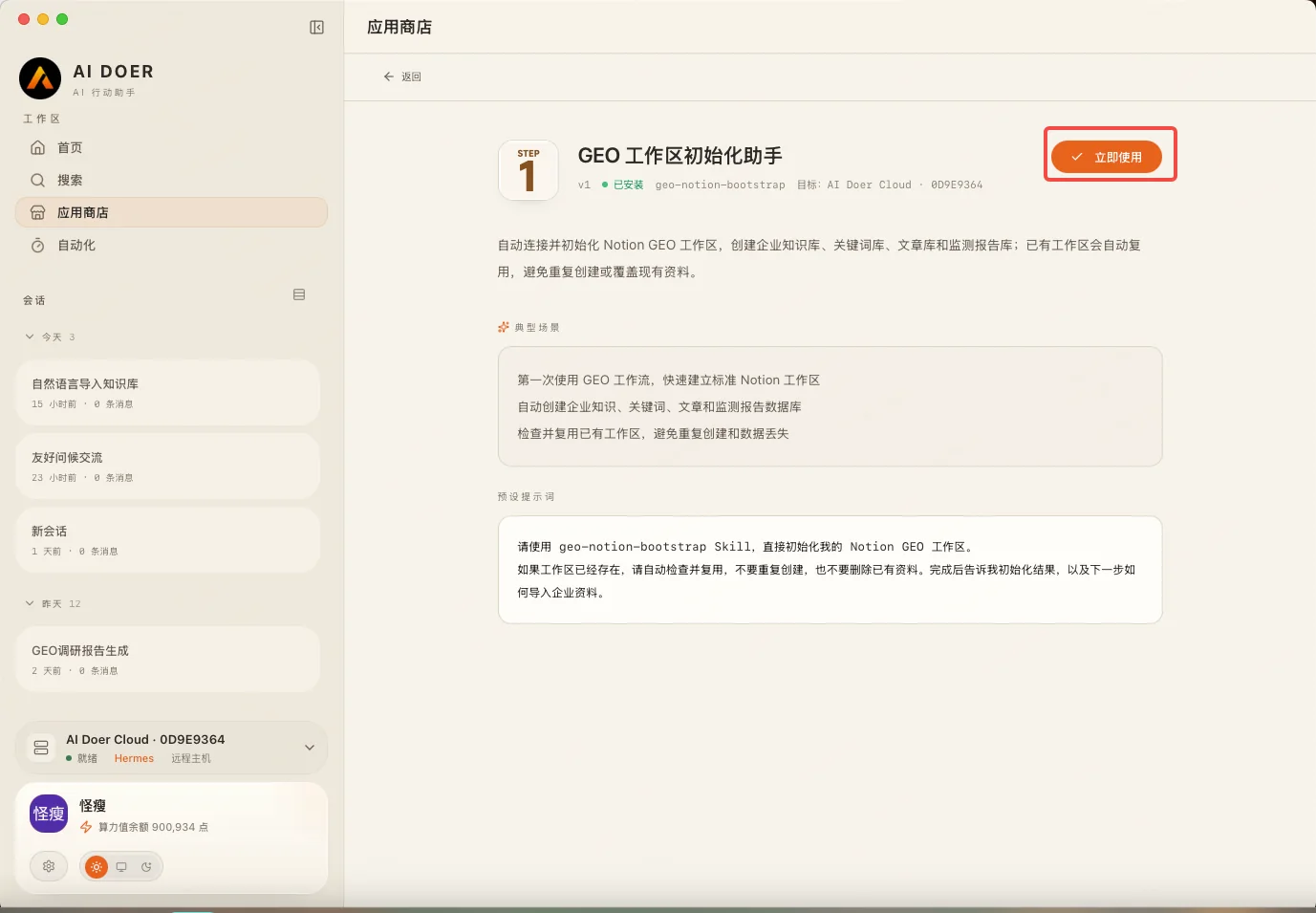
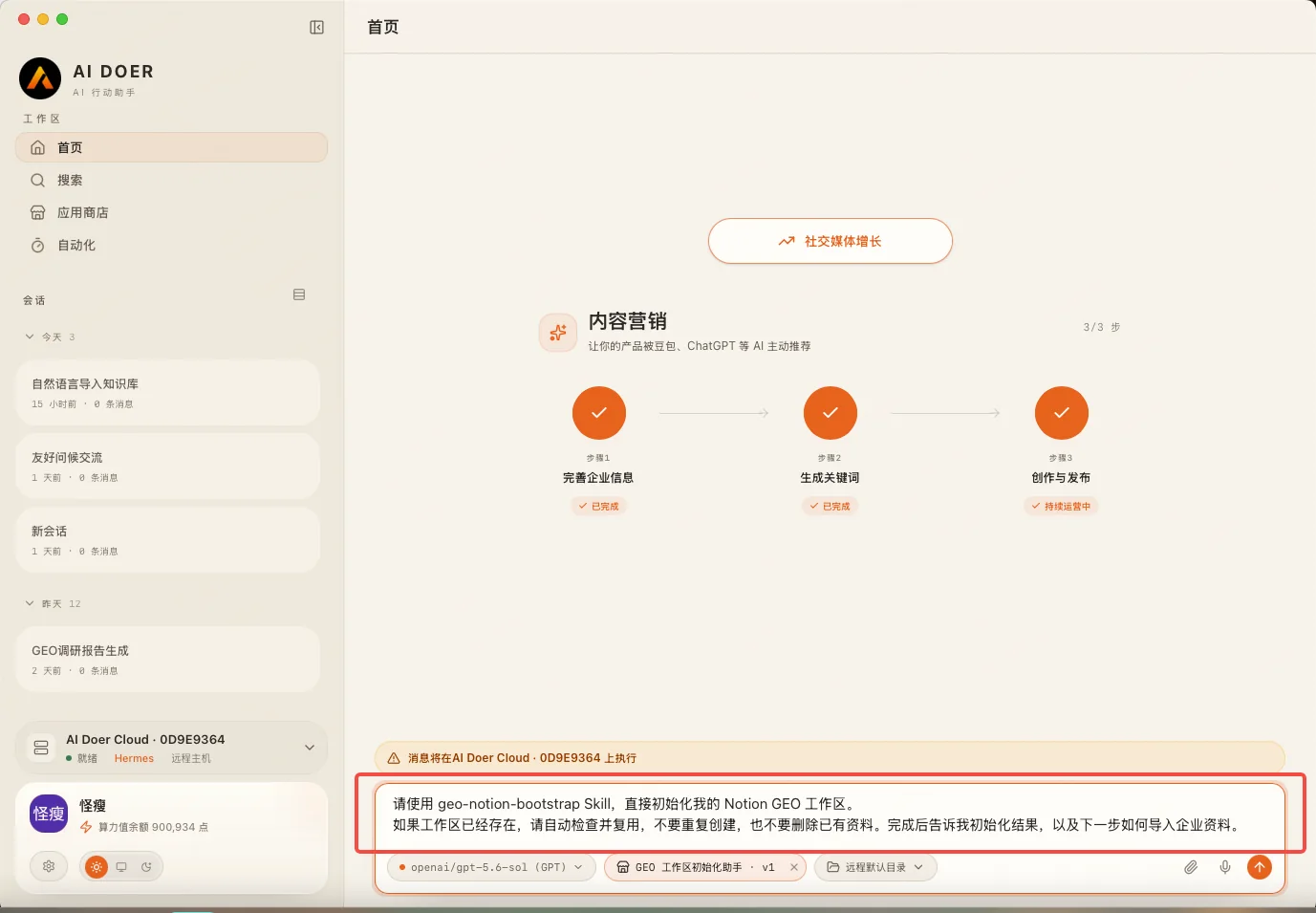
Open the AI Doer App Store and select GEO Workspace Initialization Assistant.
When you open it, the dialog is automatically prefilled with the appropriate system prompt. Click Send, then follow the setup instructions from AI Doer.
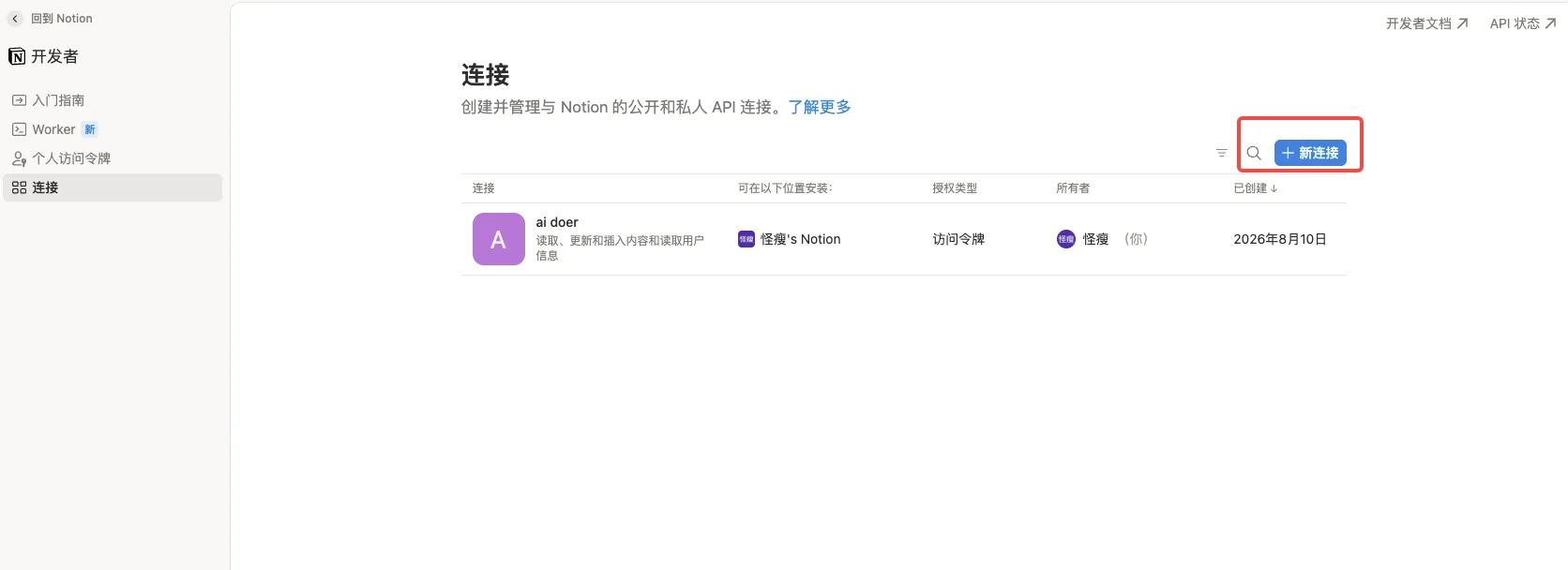
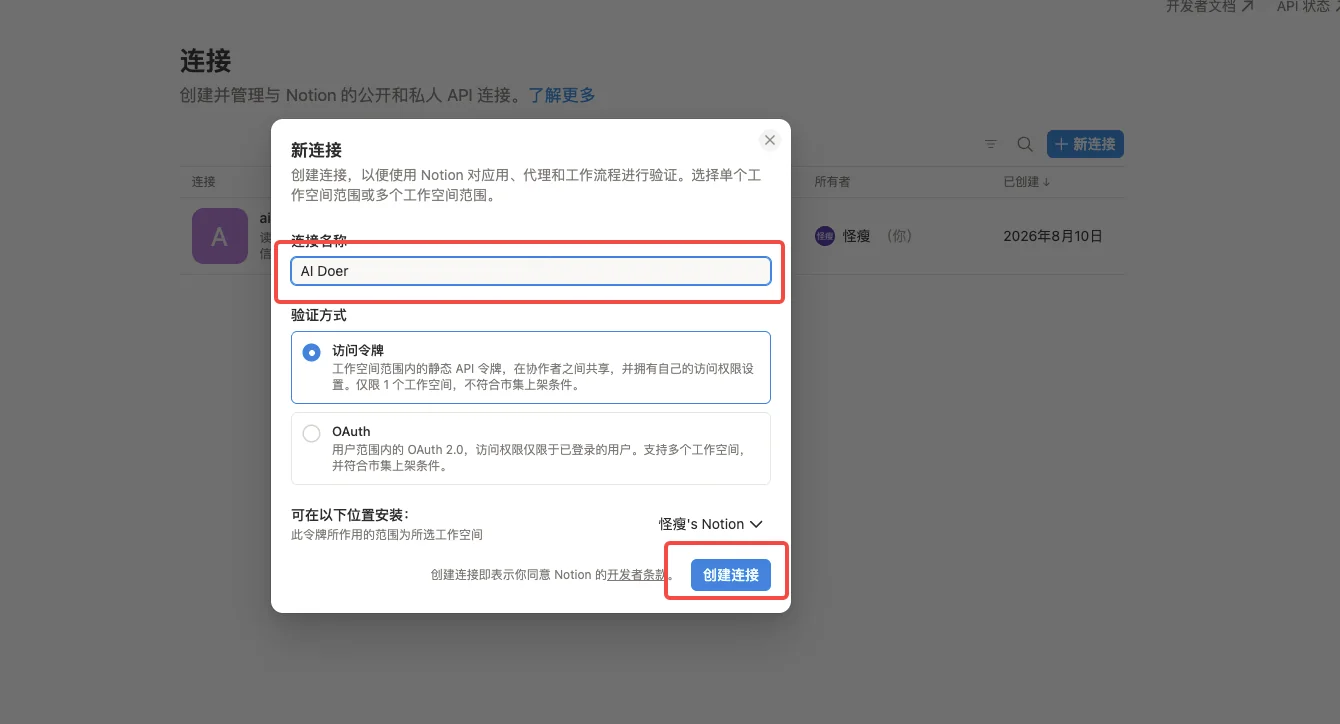
2. Create a Notion integration and obtain an API key
Follow the tutorial provided by AI Doer to create an integration in Notion.
Once the integration is ready, copy its API key. AI Doer will use this key to connect to your Notion workspace.
3. Create and connect a Notion page
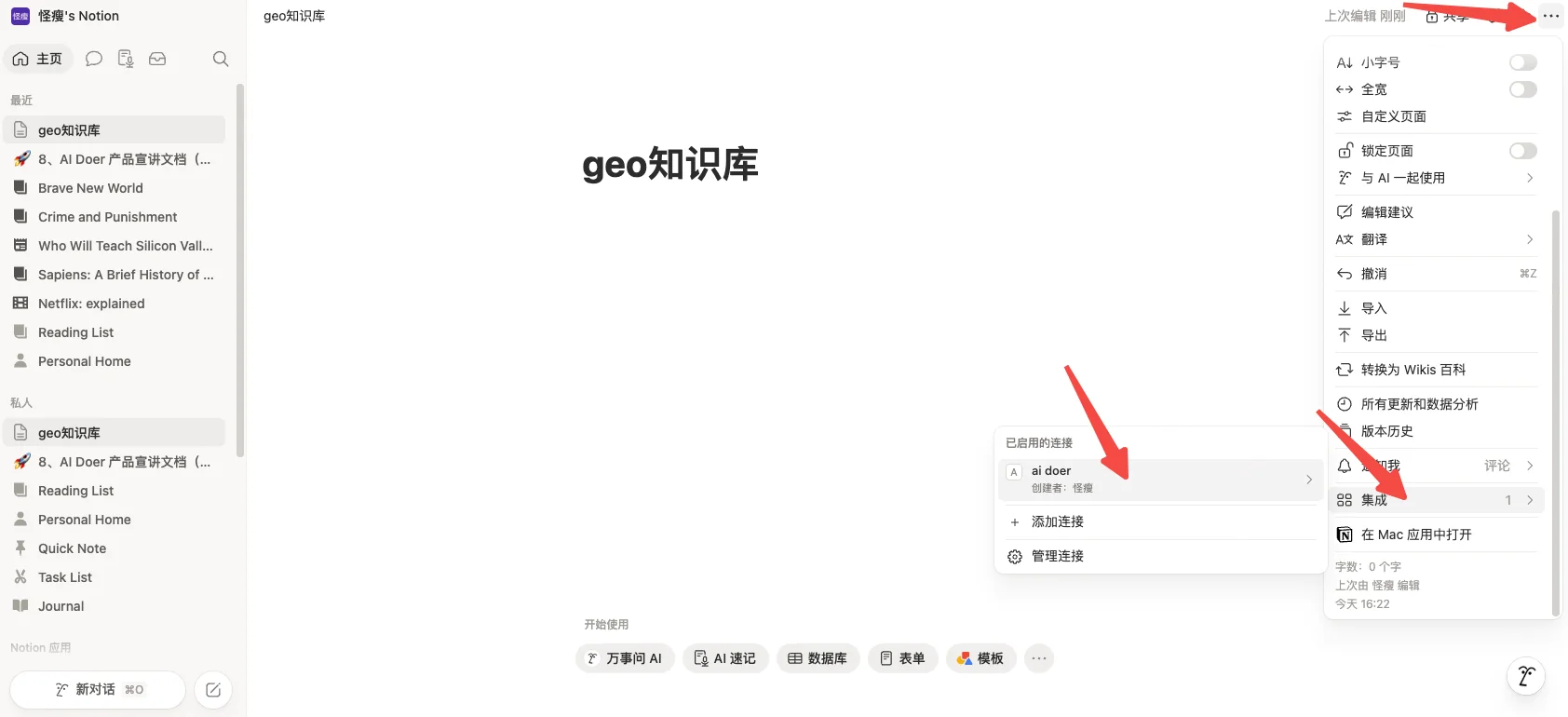
Continue following the AI Doer tutorial and create a new Notion page.
After creating the page:
- Click the ••• menu in the top-right corner;
- Find Connect to;
- Select the integration you just created, such as AI Doer.
Once connected, you can add:
- Company overview;
- Brand information;
- Product information;
- Service overview;
- Other company-related materials.
This information becomes source material for future GEO content. You can also ask AI to expand the knowledge base in Step 4.
4. Configure the API key securely
Enter the Notion API key only in the secure credential or integration settings provided by AI Doer. Do not paste the key into a normal chat message, document, screenshot, or other public location.
If any part of the process is unclear, ask AI Doer to explain the configuration steps without including the key itself.
5. Confirm permissions
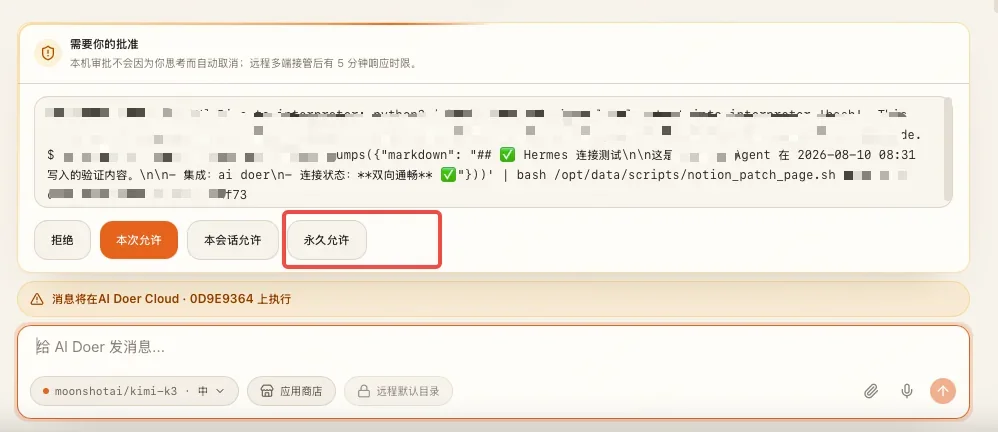
If a manual approval prompt appears during setup, review the requested action and permission scope before approving it. Prefer one-time or least-privilege authorization; use persistent authorization only when you understand and need the ongoing access.
Once authorization is complete, continue to the next step.
Step 3: Assess Current GEO Performance and Generate a Diagnostic Report
Open the AI Doer App Store and select ChatGPT GEO Performance Report Assistant.
Using your company and competitor materials, AI Doer researches how AI platforms respond when users ask relevant questions. It generates a GEO diagnostic report and writes the complete report to Notion.
Use this report as the baseline for your GEO program. It shows how your brand currently performs in AI search and answers.
Pay particular attention to:
- Whether AI mentions or recommends your brand in response to relevant questions;
- Which questions cause competitors to appear more often;
- Brand exposure across different keywords, questions, and use cases;
- The websites, articles, and other sources most often cited in AI answers;
- Whether previously published GEO content is gradually being discovered, cited, or used to answer related questions.
Repeat Step 3 on a regular schedule.
GEO measurement is not a one-time task. After the first assessment, repeat Step 3 on a fixed schedule and compare results over time. Monitor:
- Changes in AI answers;
- Changes in brand exposure;
- Changes in competitor performance;
- Changes in search results;
- Changes in the sources cited by AI.
Adjust the frequency to match your publishing volume; you do not need to run it every day.
For example, publish a batch of GEO content, then run another assessment and compare the before-and-after results.
If an important keyword still shows that:
- Your brand rarely appears;
- Competitors continue to be recommended;
- AI primarily cites other websites;
then that topic still has room for improvement. Continue building content around it rather than immediately switching to a large set of new keywords.
This creates a continuous optimization cycle:
Initial GEO benchmark → ongoing publishing → scheduled retesting → performance review → keyword and content adjustments.
Step 4: Upload and Organize Your Company Knowledge Base
Upload the materials you want AI Doer to organize, including:
- Webpage links;
- Article text;
- Company materials;
- Product materials;
- PDF, Word, and other attachments.
Then enter this prompt:
You are my GEO company knowledge-base assistant. Organize the webpage links, article text, and attachments I provided in this conversation, and import them into my Notion GEO knowledge base.
AI Doer will organize the materials and import the relevant content into your Notion GEO knowledge base.
Provide company information that is as complete and accurate as possible. It will become the factual foundation for keyword analysis and article generation.
Step 5: Generate Core GEO Keywords
Open the AI Doer App Store and select GEO Core Keyword Generator Assistant.
AI Doer generates core GEO keywords from your company knowledge base and automatically adds them to the GEO workspace in Notion.
After generation, review the keywords in Notion and, based on your actual business needs:
- Add keywords;
- Remove irrelevant keywords;
- Adjust the scope.
Step 6: Generate GEO Distilled Keywords
Open the AI Doer App Store and select GEO Distilled Keyword Generator Assistant.
AI Doer combines:
- Core keywords in your keyword repository;
- Content from your company knowledge base;
and generates commercially relevant GEO distilled keywords, then writes them back to the keyword repository.
These distilled keywords will guide GEO article topics and content generation.
Step 7: Generate GEO Articles
Open the AI Doer App Store and select GEO Article Generator Assistant.
It is recommended that you run Step 7 as a daily operating task.
Each day, choose the keyword your team is focusing on during the current phase and enter it in the dialog.
AI Doer will:
- Retrieve the selected core keyword;
- Match it with relevant distilled keywords in the keyword repository;
- Retrieve supporting information from the company knowledge base;
- Generate a GEO article from the keyword, distilled keywords, and company materials;
- Save the article to the Notion article repository.
When the article is ready, review it in Notion and confirm that:
- Company and product information is accurate;
- No data or capabilities have been invented;
- The article genuinely answers the user’s question;
- The writing sounds natural;
- The content matches your brand and business positioning.
Move to publishing only after the review is complete.
1. Do not target too many keywords in one phase
It is not recommended to switch to a completely unrelated keyword every day.
A better approach is to choose 1–2 keywords closely tied to your core business for each phase, and keep producing content around those same 1–2 keywords.
A phase may last one month, two months, or longer, depending on article volume and GEO measurement results.
This lets you expand one topic across different user needs and use cases instead of scattering your content across unrelated keywords.
When the Step 3 report shows that the topic has achieved solid coverage—or reveals a better opportunity—adjust the priority keywords for the next phase.
2. How to choose core keywords
Start with the keywords most closely tied to your business.
Consider three questions:
First, is the keyword directly related to your core product or service?
Prioritize terms that directly represent your products, services, solutions, or core capabilities. Do not begin with a large number of loosely related terms simply to chase more traffic.
Second, are users genuinely likely to ask an AI system about it?
Rather than focusing only on broad industry terms, consider what users may ask when they are:
- Choosing a product;
- Looking for a solution;
- Comparing products;
- Looking for a service provider;
- Trying to solve a specific problem.
Third, is the competition appropriate for this phase?
An important core term can remain a long-term priority even when competition is intense. But a company that is just starting GEO does not need every article to compete for the broadest terms. You can also begin with long-tail keywords built around the core business.
3. When competition is intense, expand into long-tail keywords
Long-tail keywords typically add one or more of the following to a core term:
- A specific audience;
- A specific industry;
- A specific use case;
- A specific need;
- A specific problem;
- A location;
- A product feature;
- Comparison or selection criteria.
Compared with broad terms, long-tail keywords usually map to much clearer user questions.
For example, assume a company’s main product is AI customer service software.
Its core keyword could be:
AI customer service software
If that term is highly competitive, expand it into:
- AI customer service software for cross-border e-commerce;
- Shopify AI customer service software;
- AI customer service software with multilingual support;
- AI customer service software for small and medium-sized businesses;
- AI customer service that automatically replies to Facebook messages;
- How AI customer service software reduces support costs;
- AI customer service software vs. traditional live-chat software.
These topics remain anchored to the same core business while addressing more specific user needs.
4. One core keyword can support many articles
Choosing one keyword does not mean publishing only one article about it.
For the core keyword AI customer service software, you could create articles around different distilled topics and user questions:
- What is AI customer service software?
- Which companies are a good fit for AI customer service software?
- How should cross-border e-commerce companies choose AI customer service software?
- Which support problems can AI customer service software solve?
- What is the difference between AI customer service software and a traditional support system?
- How should you choose AI customer service software with multilingual support?
- How can AI customer service software help a company reduce support costs?
A phase-level content strategy should therefore look like this:
1–2 core keywords + multiple long-tail or distilled topics + multiple GEO articles
—not a completely different core keyword every day.
Step 8: Publish the Articles
After review, publish the articles on channels your company can operate consistently, such as:
- Your company blog. Your website is an owned channel where you can build a lasting content library. If you do not have a website yet, you can use AI Doer to build one for free. Even with no coding experience, you can follow the Complete Guide to Building and Launching a Website with AI Doer step by step to create, preview, and launch it. Once the site includes a blog, your company can publish and manage its GEO articles directly;
- Your Facebook Page. Publish the full article, or post a short summary with a link to the original article on your website;
- Relevant Reddit communities. Choose communities related to your industry and the article topic.
If you do not have suitable accounts, Pages, or community publishing resources for Facebook and Reddit, you can pay a third-party article-placement service to publish the articles through relevant channels. Before purchasing a placement service, confirm the publishing platform, number of articles, price, publication schedule, and final live URLs. Whether you publish directly or pay for third-party placement, keep a record of every article so you can evaluate GEO performance later.
Following the original operating cadence, you can maintain a publishing frequency of 1 article per platform per day.
Continue building the content library, then repeat Step 3: Assess Current GEO Performance and Generate a Diagnostic Report on a regular schedule. Compare:
- AI answer performance;
- Brand exposure;
- Competitor performance;
- Changes in cited sources.
This completes the GEO operating loop:
Company knowledge base → core keywords → distilled topics → GEO articles → multi-platform publishing → GEO measurement → continuous optimization.